Operational Context
While enterprise IT environments get all the glory, the most common security failures happen in small, single-license tenants. As a Business Analyst and Systems Admin, I treat my own production environment (M365 Business Basic) as a laboratory for security fundamentals.
Last verified: May 13, 2026. Microsoft licensing and default tenant behavior change over time. Security Defaults, Conditional Access, Entra ID P1/P2, and Microsoft 365 Business Premium are different control levels; check Microsoft’s current Security Defaults and Microsoft 365 security guidance before copying this into a client tenant.
The Problem: The "Default" Security Gap
Small tenants can still drift into risky configurations, especially when owners do not review identity, consent, and sign-in settings. Depending on when the tenant was created and which defaults are active, the risk areas usually include:
- Legacy Authentication Exposure: Older protocols and client behavior should be reviewed, even when Security Defaults are enabled.
- User App Consent: Users can accidentally authorize risky third-party apps if consent is not controlled.
- MFA Method Quality: MFA should favor stronger methods such as Microsoft Authenticator or phishing-resistant options where licensing and operations allow.
The Solution: A 3-Phase Security Audit
I performed a systematic hardening session in the Microsoft Entra admin center to bring this tenant closer to Microsoft’s recommended baseline for small environments.
Phase 1: Identity Protection
- Security Defaults: Enabled "Security Defaults" in the Entra ID Properties. This automatically enforces MFA for all users and blocks legacy authentication protocols across the board.
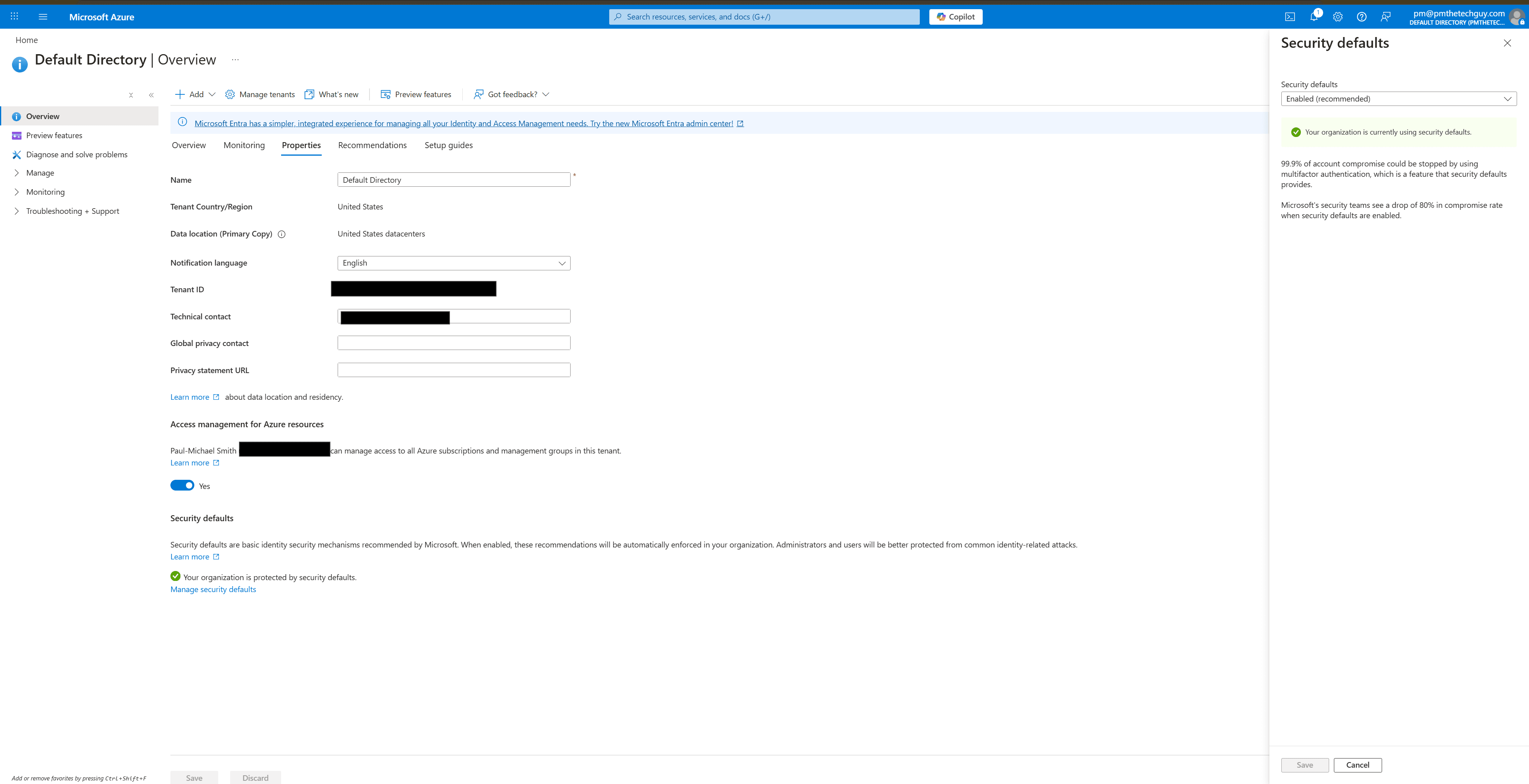 Figure 1: Verified Security Defaults status in the Entra ID portal.
- Conditional Access Boundary: Business Basic does not include the same Conditional Access capability as Entra ID P1/P2 or Microsoft 365 Business Premium. In a Business Basic tenant, Security Defaults and manual review processes are the realistic baseline unless you upgrade licensing.
Phase 2: Application Governance
- Consent Settings: Navigated to Enterprise Applications > User Settings.
- The Change: Disabled the ability for users to consent to apps accessing company data. All new integrations now require an "Admin Review" workflow—even if I am both the user and the admin. This prevents "Illegal Consent Grants."
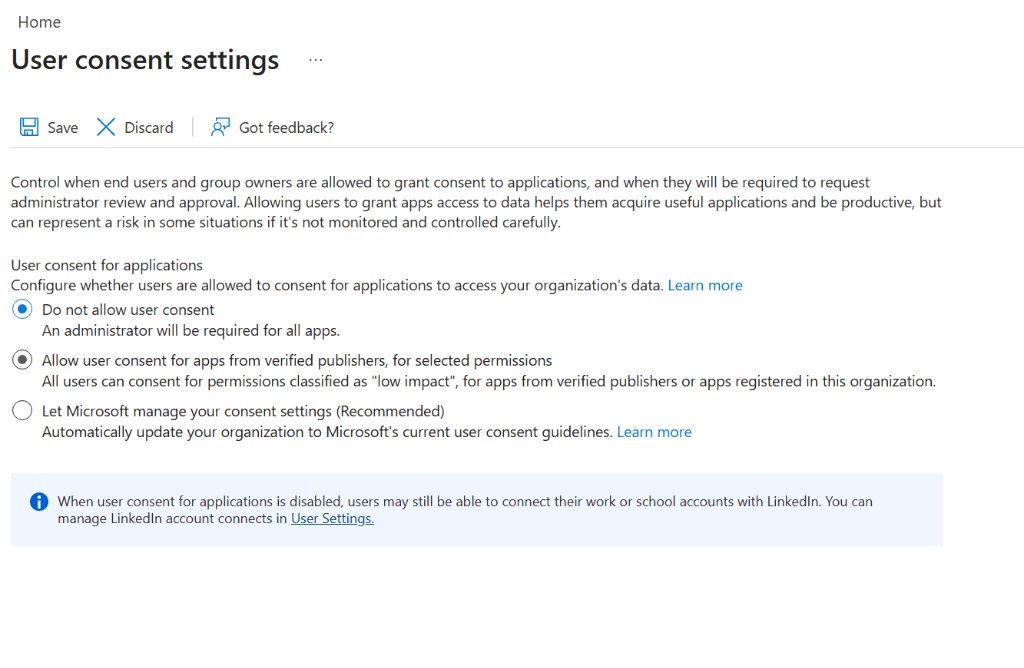 Figure 2: Restricting application consent to require administrative approval.
Phase 3: Monitoring & Logs
- Audit Logs: Configured a weekly review of the Sign-in logs.
- Finding: Identified and blocked several failed sign-in attempts from unauthorized geographic regions, further validating the need for the hardening.
5-Point Production Structure
1. The Strategy
The strategy was to treat a low-cost monthly license with the same defensive mindset as a large enterprise deployment.
2. The Logic
Used RBAC (Role-Based Access Control) logic. I created a separate emergency admin account for account-lockout scenarios; for client or production environments, Microsoft recommends planning for two cloud-only emergency access accounts and monitoring their use.
3. Verification
Verified using the Microsoft Secure Score. The hardening actions increased the tenant's security posture by 35 points in a single session.
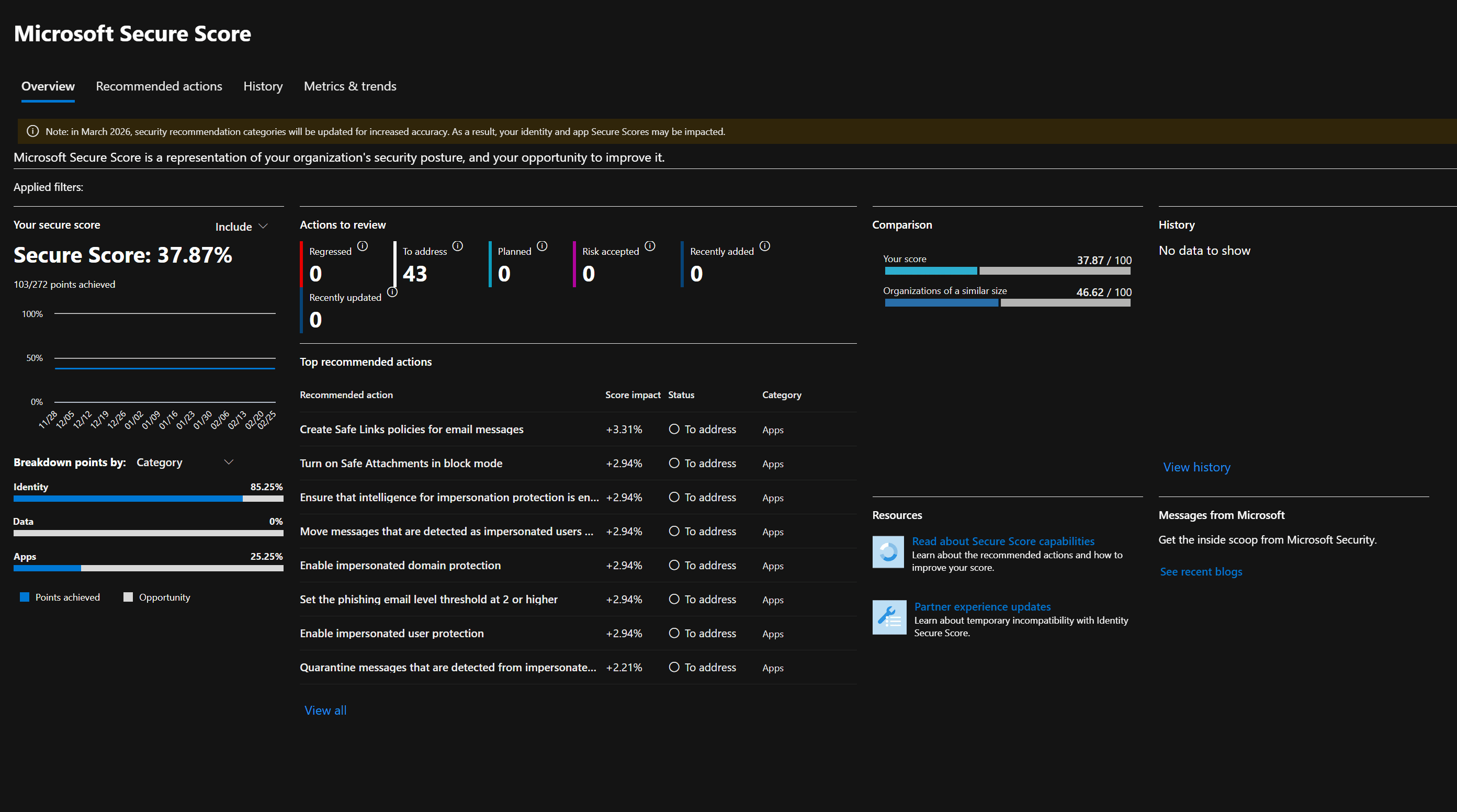 Figure 3: My live tenant's security score, reflecting the impact of the hardening audit.
4. Implementation
Documented every change in a "Tenant Change Log", proving that I follow standard Change Management procedures even in a solo environment.
5. Troubleshooting (RCA)
Insight: Enforcing Security Defaults initially broke an old legacy printer's "Scan-to-Email" function. Fix: Migrated the printer to a secure Direct Send method that doesn't rely on legacy SMTP Auth, maintaining the security boundary.
Career Signal: Production Responsibility
Managing a live, paid tenant shows that you understand the consequences of configuration. Unlike a student sandbox, a mistake here affects real mailboxes and real branding. This demonstrates the "Quiet Competence" that separates a hobbyist from a professional systems administrator.