Most automation scripts start as a single main.py file with 500 lines of code.
That works for day one. But by day thirty, it's a nightmare to debug.
After building tools like the Document AI Starter, I’ve settled on a project structure that balances simplicity with scalability.
Why Modular Scripts Matter
When automation breaks (and it will), you need to know where. Is it the API connection? The data parsing logic? The file system permissions?
By splitting your code into logical modules, you isolate failures.
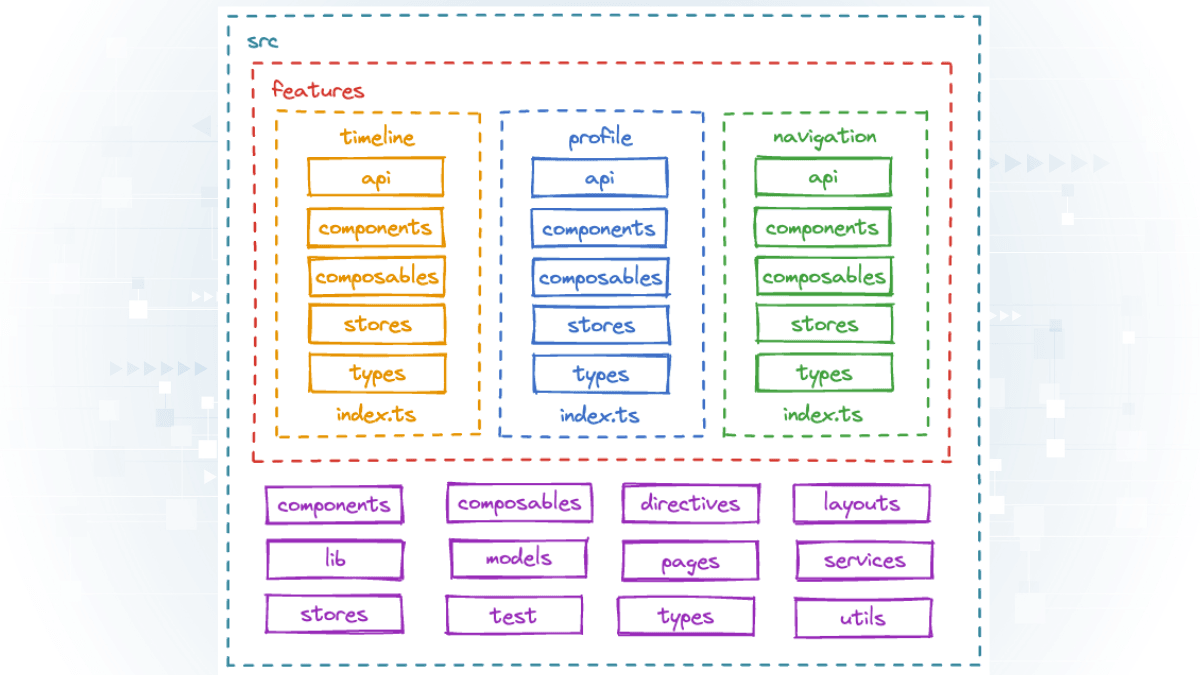
My Standard Directory Layout
my-automation-tool/
├── config/
│   ├── settings.yaml      # Non-sensitive config
│   └── secrets.env        # API keys (git-ignored)
├── src/
│   ├── core/
│   │   ├── api_client.py  # All external API calls
│   │   └── parser.py      # Logic to process data
│   ├── utils/
│   │   ├── logger.py      # detailed logging setup
│   │   └── file_ops.py    # Read/write helpers
│   └── main.py            # Entry point
├── tests/
├── requirements.txt
└── README.md
CLI vs. UI Separation
I always separate the logic from the interface.
Your core/parser.py should not know about Streamlit or a CLI. It should just take input and return output.
This allows me to attach multiple interfaces to the same core logic:
- A CLI for scheduled cron jobs.
- A Streamlit UI for manual review.
Logging Strategy
Never use print(). Always use Python's logging module.
I configure my logger to write to both the console (for me) and a rotating file (for history).
# src/utils/logger.py
import logging

logging.basicConfig(
    level=logging.INFO,
    format='%(asctime)s - %(levelname)s - %(message)s',
    handlers=[
        logging.FileHandler("app.log"),
        logging.StreamHandler()
    ]
)
Config vs. Secrets
This is rule #1 of security: Never commit API keys.
I use python-dotenv to load secrets from a .env file, and PyYAML to load non-sensitive settings (like "output_folder_name") from a config.yaml.
Reusability Mindset
Finally, write functions that do one thing well.
Instead of process_all_files(), write process_single_file(path).
Then, write a loop that calls it. This makes testing easier and allows you to reuse the single-file logic in other contexts.
See it in action: This exact structure is what powers the Document AI Starter project.